
Tips for Organizing a Clutter-Free and Efficient Home Workspace
Creating a well-organized and clutter-free home workspace is essential for maintaining productivity and focus. Whether you work remotely full-time or need a quiet spot for occasional tasks, your environment plays a big role in how efficiently you get things done. In this post, we’ll explore practical tips to help you design a workspace that supports your work habits while keeping clutter at bay.
Why a Clutter-Free Workspace Matters
A tidy workspace reduces distractions and mental stress, allowing you to concentrate better. Clutter can lead to missed deadlines, lost documents, and even decreased motivation. Establishing an organized home office helps streamline your work process and makes daily tasks feel less overwhelming.
Step 1: Choose the Right Location
Before organizing your desk and supplies, start by selecting the best spot in your home for your workspace.
– Natural Light: Aim to set up near a window for natural light, which helps reduce eye strain and boosts mood.
– Low Traffic: Pick a quiet area with minimal foot traffic to minimize interruptions.
– Space Requirements: Ensure there’s enough room for your computer, paperwork, and any equipment you need.
Step 2: Declutter and Sort Essentials
Once you have a location, clear everything off your desk and surrounding areas.
– Sort Items: Separate items into categories: essentials, occasionally used, and unnecessary.
– Discard or Donate: Get rid of items you no longer need or use.
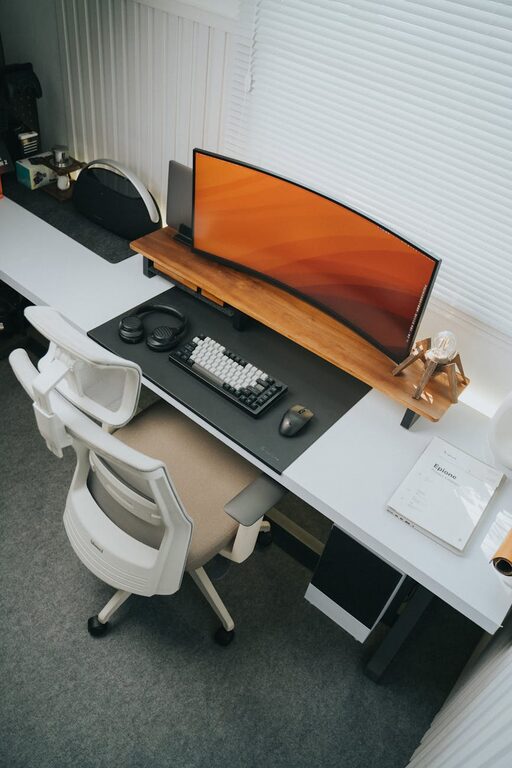
– Limit Desk Items: Only keep daily essentials on your desk like your computer, notepad, pens, and a water bottle.
Step 3: Organize Your Desk Efficiently
An organized desk supports good habits and productivity. Here are ways to keep it tidy:
Use Storage Solutions Strategically
– Drawers and Organizers: Use drawer dividers and small bins to keep supplies like paper clips, sticky notes, and chargers neatly arranged.
– Desk Trays: Stackable trays can hold incoming paperwork, to-do lists, or mail.
– Vertical Storage: Utilize wall-mounted shelves or pegboards to free up desk space while keeping things within reach.
Keep Cables Managed
Messy cables can add to the clutter and create distractions.
– Use cable clips, ties, or sleeves to bundle and route cables neatly.
– Position your power strips in hidden or less visible spots.
– Label cables so you know which plug belongs to which device.
Step 4: Implement a Filing System
Paper clutter builds up quickly, so having a system for organizing documents can save time and reduce mess.
– Folders or Binders: Categorize documents by project, client, or urgency.
– Digital Backup: Scan important papers and store them securely on your computer or cloud service to minimize physical copies.
– Regularly Purge: Schedule time monthly or quarterly to review and discard outdated documents.
Step 5: Optimize Lighting and Ergonomics
A comfortable workspace supports your health and helps maintain focus.
– Task Lighting: Use adjustable desk lamps to provide direct lighting without glare.
– Ergonomic Furniture: Invest in a supportive chair and desk height that promotes good posture.
– Screen Position: Place your monitor at eye level and at a comfortable distance to avoid neck strain.
Step 6: Personalize Without Overcrowding
Adding a few personal touches can make your workspace inviting, but avoid overdoing it.
– Choose a few small items like a plant, a photo frame, or artwork for inspiration.
– Keep decorations minimal and neatly arranged to maintain the sense of order.
Step 7: Maintain Your Workspace Daily
Organization is an ongoing process, not a one-time task.
– End-of-Day Routine: Spend five minutes tidying your desk before finishing work.
– Weekly Review: Assess your workspace and replenish supplies as needed.
– Adopt Minimalism: Continually ask yourself if each item adds value or just takes up space.
Bonus Tips for Efficiency
– Use Time Blocks: Organize your workday into chunks with specific focus areas.
– Digital Tools: Employ apps for task management and reminders to reduce paper reliance.
– Noise Control: Consider noise-canceling headphones or white noise machines to improve concentration.
—
By following these steps, you can create a home workspace that not only looks neat but also supports sustained productivity. Remember, the goal is to build an environment that works for you — clear enough to stay focused, and flexible enough to adapt as your needs change. Happy organizing!